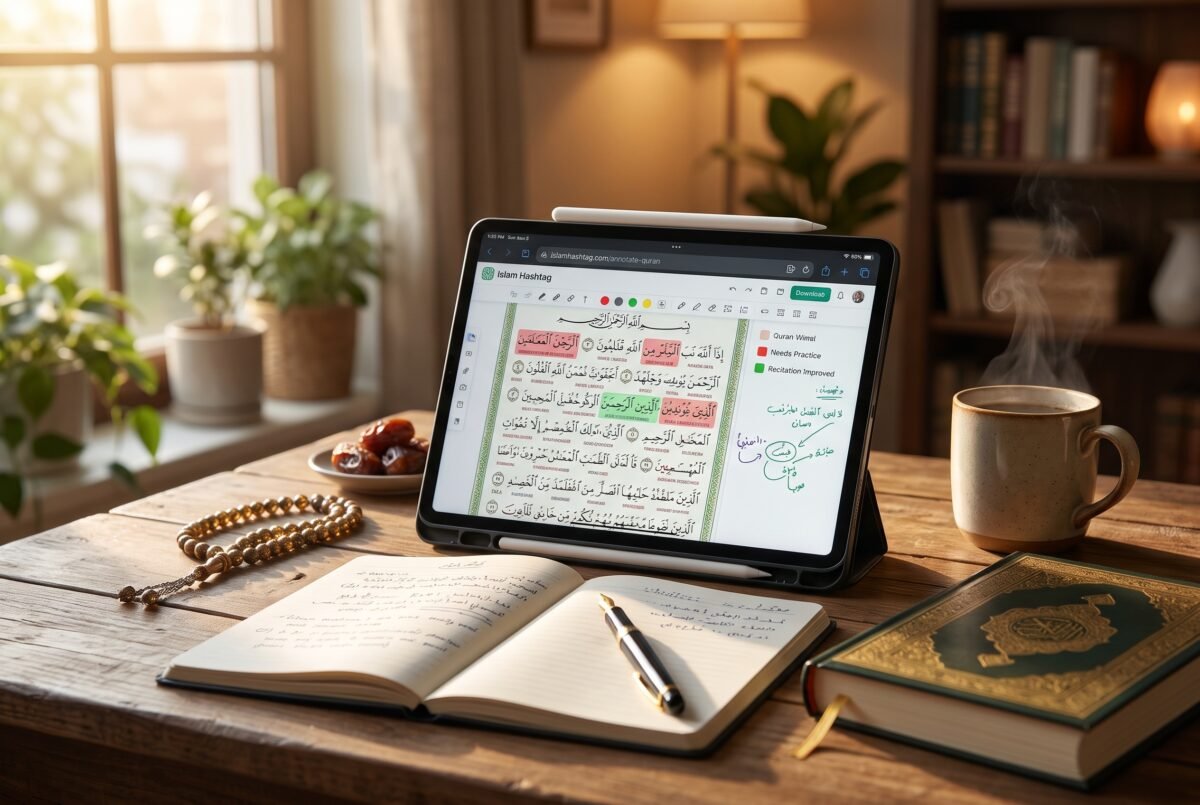

Why I Built a Simple Quran Annotation Tool (And How You Can Use It in Your Daily Study)
If you have ever taken a Tajweed class or sat down to study the meaning of the Quran word by word, you probably know that familiar feeling of scrambling for a pencil. Your teacher corrects a Qalqalah or points out a heavy letter, you scribble a tiny mark in the margin of your Mushaf, and by next week, you can barely read your own handwriting—or worse, you completely forget why you circled that word in the first place.
I struggled with this exact problem for years. Between loose notebooks, sticky notes falling out of my Mushaf, and trying to keep track of new Arabic root words, my study notes were scattered everywhere. I wanted one quiet, dedicated digital space where I could actually interact with the text as I learned, without losing track of my progress.
So, I finally decided to build it myself. I’m really excited to share my newest project with you: a dedicated Quran annotation tool over on Islam Hashtag.
How It Works: Your Digital Study Mushaf
My goal wasn’t to create another overwhelming app packed with complicated menus. I wanted it to feel just like sitting down with your personal study Mushaf and a set of colored pens—only smarter.
Here is a step-by-step look at how you can use it in your daily routine:
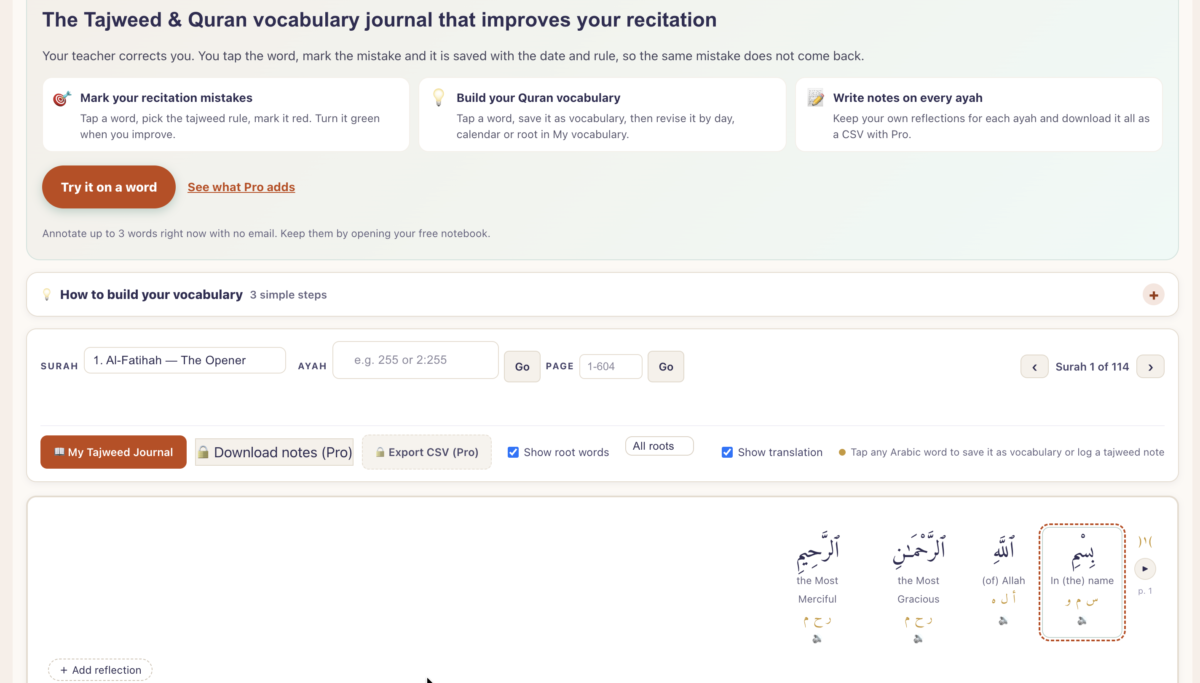
1. Open Any Surah and Tap Any Word You don’t need to sign up, enter your email, or set a password just to try it.Simply navigate to your Surah, Ayah, or Mushaf page (1–604). If you want extra context while reading, you can toggle Show root words (filtering by all roots or verbs only) and Show translation right above the text. Whenever you spot a word you want to study or mark, just tap directly on it.
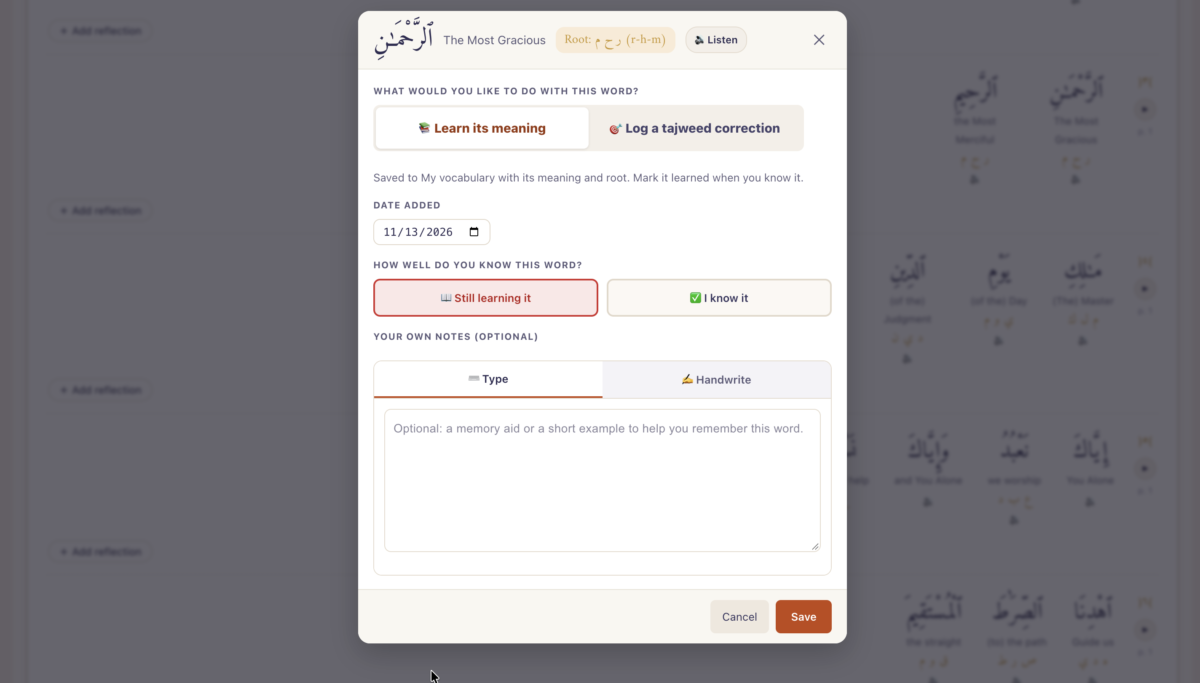
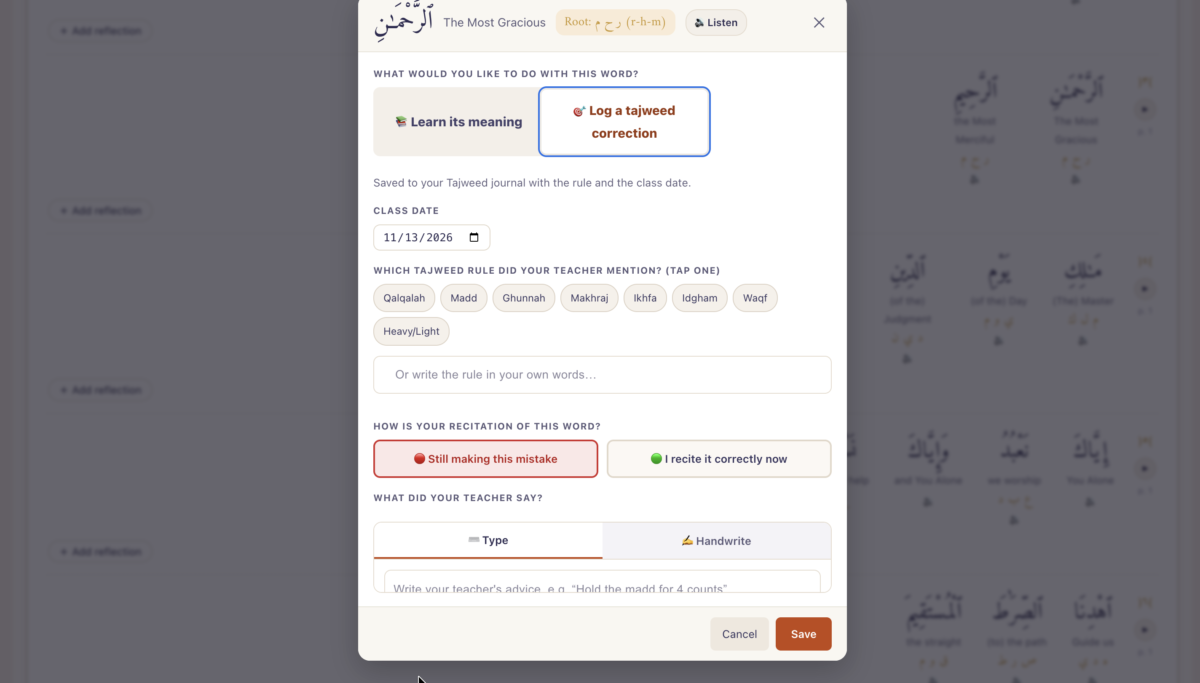
2. Log Your Tajweed Corrections (Red to Green) When you tap a word, a clean annotation card pops up. You can listen to the word’s audio pronunciation to double-check how it sounds, then select Tajweed Mistake. From there:
- Pick the exact rule: Tap from common Tajweed rules like Qalqalah, Madd, Ghunnah, Makhraj, Ikhfa, Idgham,Waqf, or Heavy/Light letters.
- Track your status: Mark the word Red (Needs Practice) along with your class date so you remember what your teacher pointed out. Once you practice and master that verse, come back and flip the status to Green (Recitation Improved!).
3. Build Your Quranic Vocabulary & Root List If you are studying Arabic alongside your recitation, tap a word and choose Vocabulary / Meaning. You will immediately see the word’s translation and its Arabic root (powered by the Quranic Arabic Corpus). Saving it automatically adds it to your personal vocabulary tracker, where you can later review your words organized by day, on a calendar, or grouped by Arabic root.
4. Take Typed or Handwritten Ayah Notes Sometimes a single word isn’t enough—you want to capture the bigger picture of a verse. Below the Quran text, there is a dedicated section for General Ayah Reflection, Tafseer Notes, and Advanced Arabic Notes.
- Prefer typing? Jot down reflections from your favorite tafsir lecture.
- Using an iPad, tablet, or stylus? Switch to the Handwritten pad (with thin, medium, and thick pen options) to write out i’rab (grammar) breakdowns, draw arrows between words, or sketch mouth-position diagrams for tricky letters.
5. Review Everything in Your Tajweed journal Every note you save goes straight into My Tajweed Practice Journal.Instead of flipping through dozens of pages looking for old corrections, you can filter your journal by Needs Practice,Improved, or Vocabulary, or search directly by Arabic word, root (like ktb), or meaning. If you decide to unlock Pro, you can also download your entire journal as a CSV spreadsheet, export your handwritten drawings as a ZIP file, or save everything as a clean PDF to print out.
Give It a Try Today
You can jump straight in and annotate up to three words right away with zero friction. If you like how it feels, you can open a free notebook to keep your daily study streak alive and save your progress across devices.
Whether you are a student trying to remember your teacher’s corrections, someone building their Quranic Arabic vocabulary, or simply a believer who loves journaling reflections alongside the verses, I built this Quran annotation toolwith your journey in mind.
Head over to islamhashtag.com/annotate-quran, tap a word in your favorite Surah, and see how it fits into your routine.Because it’s brand new, I would genuinely love to hear what you think—try it out and let me know what features would help your Quran study the most!
If you have ever taken a Tajweed class or sat down to study the meaning of the Quran word by word, you probably know that familiar feeling of scrambling for a pencil. Your teacher corrects a Qalqalah or points out a heavy letter, you scribble a tiny mark in the margin of your Mushaf, and by next week, you can barely read your own handwriting—or worse, you completely forget why you circled that word in the first place.
I struggled with this exact problem for years. Between loose notebooks, sticky notes falling out of my Mushaf, and trying to keep track of new Arabic root words, my study notes were scattered everywhere. I wanted one quiet, dedicated digital space where I could actually interact with the text as I learned.
So, I finally decided to build it myself. I’m really excited to share my newest project with you: a dedicated Quran annotation tool over on Islam Hashtag.
How It Helps You Learn (Without the Clutter)
My goal wasn’t to create another overwhelming app packed with complicated menus. I wanted it to feel just like sitting down with your personal study Mushaf and a set of colored pens—only smarter.
Here is how you can use it in your daily study:
- Track Your Tajweed Mistakes Visually: When your teacher corrects your recitation, simply tap the exact Arabic word, pick the Tajweed rule (like Madd, Ghunnah, Ikhfa, or Makhraj), and mark it in red as Needs Practice. Once you master it, flip it to green to celebrate your progress. It automatically logs the date so you can watch your recitation improve over time.
- Master Quranic Vocabulary & Roots: Tapping any word lets you listen to the audio pronunciation, view the translation, and uncover its Arabic root word. You can save tricky words straight to your personal vocabulary list to revise later.
- Typed or Handwritten Notes: Whether you prefer typing out Tafsir reflections or using a stylus/tablet pen to handwrite i’rab (grammar) diagrams and mouth-position arrows, every ayah has space for your personal notes.
- Zero Friction to Start: You don’t even need to create an account or enter an email to test it out. You can jump straight in, tap any word, and annotate up to three words right away to see how it feels. (And if you love it, you can open a free notebook to save your streak, or upgrade to Pro for unlimited notes, handwritten pads, and CSV/PDF backups).
Give It a Try Today
Whether you are a student trying to remember your teacher’s corrections, someone building their Quranic Arabic vocabulary, or simply a believer who loves journaling reflections alongside the verses, I built this Quran annotation toolwith your journey in mind.
Head over to islamhashtag.com/annotate-quran, tap a word in your favorite Surah, and see how it fits into your routine.Because it’s brand new, I would genuinely love to hear what you think—try it out and let me know what features would help your Quran study the most!
Discover more from Islam Hashtag
Subscribe to get the latest posts sent to your email.